Best Mini PC for a Home Server (2026): N150 vs N305 vs N100 and Beyond
On this page(7 sections)
For most people, the best mini PC for a home server in 2026 is an Intel N150 box with 16–32 GB of RAM, an NVMe slot and 2.5GbE. It idles at roughly 6–9W, transcodes video with QuickSync, and runs Proxmox, Docker and Home Assistant without complaint. Step up to an 8-core N305 or N355 if you want lots of containers or a multi-gig firewall, and to a Ryzen box when you need real CPU muscle or more than 32 GB of RAM for VMs.
The rest of this guide covers the CPU tiers, the specs that matter more than the CPU, the best pick for each job, and the traps that catch first-time buyers.
Quick Picks: Which Mini PC for Which Job?
| Use case | Best pick | Why |
|---|---|---|
| All-round Proxmox / Docker box | N150, 32 GB RAM, 1 TB NVMe, 2.5GbE | Best balance of price, idle power and capability |
| Jellyfin or Plex server | N150 (or N355 for more users) | QuickSync handles HEVC and AV1 decode with ease |
| Home Assistant only | N100/N150 or a used 1-liter PC | Anything modern is overkill, so buy cheap and efficient |
| OPNsense / pfSense firewall | N100/N150 with 4× Intel i226-V | Plenty for gigabit and 2.5G routing at about 10W |
| Multi-gig firewall with IDS/IPS | N305/N355 multi-port box | Eight cores help with Suricata and Zenarmor |
| Many VMs, local AI, game servers | Ryzen 7 (Zen 4 or newer) | Dual-channel DDR5, up to 64–96 GB RAM |
| Tightest budget | Used Lenovo/HP/Dell 1-liter PC | Cheap, upgradeable, ships with RAM already installed |
2026 price warning: the ongoing DRAM shortage has pushed memory and SSD prices sharply higher this year, and mini PC makers have followed. Every price in this guide is an approximate USD range and will vary by region and week. Compare barebones and configured prices before you buy.
The CPU Tiers Explained
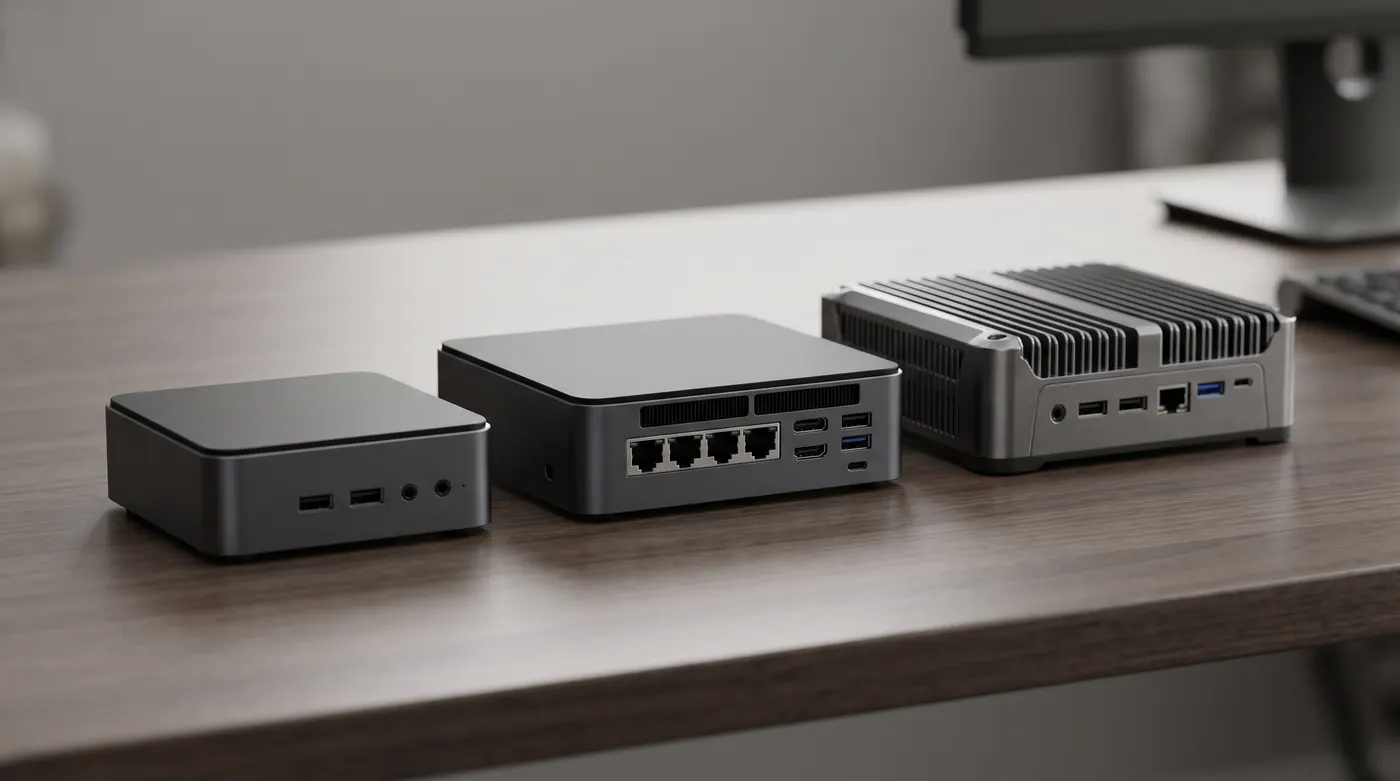
The CPU sets the ceiling, but in a home server it is rarely the first thing you run out of. Here is how the popular low-power chips compare on paper:
| Spec | N100 | N150 | N305 | N355 |
|---|---|---|---|---|
| Family | Alder Lake-N | Twin Lake | Alder Lake-N | Twin Lake |
| Cores / threads | 4 / 4 | 4 / 4 | 8 / 8 | 8 / 8 |
| Max boost | 3.4 GHz | 3.6 GHz | 3.8 GHz | 3.9 GHz |
| iGPU execution units | 24 | 24 | 32 | 32 |
| Rated TDP | 6W | 6W | 15W | 15W |
| Memory | Single channel | Single channel | Single channel | Single channel |
| Typical idle (headless) | ~6–8W | ~6–9W | ~7–11W | ~7–11W |
| Rough price (16 GB / 500 GB) | $150–220 | $170–250 | $250–380 | $270–400 |
Intel N100 and N150: the efficiency sweet spot
The N150 is essentially an N100 with slightly higher clocks. In real home-server work the difference is small, maybe 5–10% in bursty tasks. Buy whichever is cheaper on the day; most new stock is N150 now anyway. These four-core chips handle a Proxmox host with a handful of LXC containers, a Home Assistant VM, Pi-hole, a reverse proxy and a Jellyfin server at the same time. For measured idle and load figures, see the N100 and N150 power consumption guide.
Intel N305 and N355: eight cores, same tiny box
The N305 (sold as the Core i3-N305) and its Twin Lake refresh, the N355, double the core count and get a bigger iGPU while staying in the same chassis and roughly the same idle power. They make sense when you run many containers at once, compile software, run CPU-heavy apps like Immich machine learning or Paperless OCR, or want inline IDS/IPS on a 2.5G or 10G firewall. Under load they draw more than an N100 (think 25–35W rather than 20–25W), but at idle they are close.
What they do not fix is memory: like the N100, they are single-channel, and most boxes have a single SO-DIMM slot.
AMD Ryzen mini PCs: more muscle, more RAM
Ryzen mini PCs (Beelink SER, Minisforum UM, GMKtec K-series and similar) are a different class. A Zen 3 Ryzen 7 5825U or a Zen 4 Ryzen 7 8845HS gives you 8 cores and 16 threads, dual-channel memory with two SO-DIMM slots, and often 64 GB or more of RAM support. Typical idle power is a little higher, roughly 7–15W depending on the model and BIOS settings.
Pick Ryzen when you run several full VMs (Windows, a Kubernetes lab, game servers), want local AI with Ollama to feel usable, or simply need more than 32 GB of RAM. The trade-off is media: Jellyfin supports AMD hardware transcoding through VAAPI, but Intel QuickSync is the better-trodden path in both Jellyfin and Plex.
What about Wildcat Lake?
Intel's successor to the N-series, Wildcat Lake (sold as Core Series 3 parts), is just starting to appear in budget mini PCs this year. Official specs and pricing are still settling, and early boxes cost more than N150 models. Unless you need a specific new feature, an N150 or N355 bought today is a safe, well-documented choice, and the Linux and Proxmox support is mature.
The dark horse: used 1-liter business PCs
Lenovo ThinkCentre Tiny, HP EliteDesk/ProDesk Mini and Dell OptiPlex Micro machines with 8th–10th gen Intel Core CPUs are flooding the used market. They usually come with RAM already installed (a real advantage during the memory shortage), have two SO-DIMM slots, solid Intel NICs and QuickSync. Idle power is typically 8–15W. The catch: one Ethernet port, usually 1GbE, and older QuickSync without AV1 decode.
Specs That Matter More Than the CPU
RAM: capacity first, and check whether it is soldered
RAM is the resource you run out of first on Proxmox. A rough guide:
| Workload | RAM you want |
|---|---|
| Firewall only (OPNsense / pfSense) | 8 GB |
| Docker host with 10–20 containers | 16 GB |
| Proxmox with a few LXCs and one or two VMs | 32 GB |
| Many VMs, ZFS with big ARC, local AI | 48–96 GB (Ryzen territory) |
Intel officially lists 16 GB as the maximum for the N100 and N150, but 32 GB single SO-DIMMs work in practice on most boards, and many N305 boxes run 48 GB. Check owner reports for your exact model before you buy the stick.
Avoid slim models with soldered LPDDR5. They are fine for a desktop but lock you into whatever capacity they shipped with, and 8 or 12 GB fills up fast on a home server. Some NAS-style boxes use soldered RAM too, so read the spec sheet carefully.
Storage: NVMe slots and PCIe lane counts
The N-series chips have only nine PCIe 3.0 lanes, so boxes with many M.2 slots usually run each slot at x1 or x2. That sounds bad, but even PCIe 3.0 x1 (around 900 MB/s) outruns a 2.5GbE link, so it rarely matters for a network share.
What you actually want:
- At least one M.2 2280 NVMe slot for the OS and VM disks
- A second drive bay (M.2 or 2.5-inch SATA) for data or a ZFS mirror
- No eMMC-only storage: it is slow, small and wears out under server write loads
If you want a proper storage box rather than a compute box, see the TrueNAS SCALE setup guide. USB-attached drive enclosures work for backups but are a poor fit for ZFS pools.
Networking: 2.5GbE, dual LAN and Intel vs Realtek
2.5GbE is now standard on decent mini PCs, and it pairs nicely with cheap 2.5G switches. Two ports are the minimum for a router, and four are nicer. The NIC chip matters more than the port count:
| NIC chip | Linux / Proxmox | OPNsense / pfSense (FreeBSD) |
|---|---|---|
| Intel i226-V (2.5G) | Excellent; update firmware if you see link drops | Excellent, the default recommendation |
| Intel i225-V (2.5G) | Older revisions had stability issues | Usable on later revisions, but i226 is safer |
| Realtek RTL8125 (2.5G) | Works well | Workable, historically less smooth on FreeBSD |
| Intel X710 / Aquantia 10G | Good, but hot | Check model support; mind cooling |
For a router build, insist on Intel i226-V ports. For a general Proxmox host, a Realtek port is perfectly fine.
Idle power and cooling
A home server runs 24/7, so idle power is what you pay for. Every watt running all year is about 8.8 kWh, roughly $1 per year at US rates and $2.50 or more in Europe. Typical headless idle figures reported by owners:
| Machine class | Typical idle | Approx. yearly cost at $0.15/kWh |
|---|---|---|
| N100 / N150 | 6–9W | $8–12 |
| N305 / N355 | 7–11W | $9–15 |
| Ryzen 5000U / 7000-8000HS | 7–15W | $9–20 |
| Used 8th–10th gen 1-liter PC | 8–15W | $11–20 |
| Old desktop or tower server | 30–80W+ | $40–105+ |
Fanless N100 boxes are silent but run warm. Multi-port firewall boxes with 10G ports get hot enough that a quiet USB fan on top is worth it. To measure your own setup, a cheap smart plug with energy monitoring is enough.
Best Mini PC by Use Case
Proxmox all-in-one server
Get an N150 with 32 GB of RAM, a 1 TB NVMe and a second drive slot. That covers a Home Assistant VM, a dozen LXC containers, a media server and backups. If you think you will run Windows VMs or more than three or four VMs, jump straight to a Ryzen 7 with 64 GB. Our Proxmox on N100 setup guide walks through installation, storage and LXC templates.
Jellyfin and Plex with QuickSync
Intel's iGPU is the reason N-series boxes are so popular for media. The Alder Lake-N and Twin Lake QuickSync engine decodes H.264, HEVC (including 10-bit HDR), VP9 and AV1, and encodes H.264 and HEVC. Expect a few simultaneous 4K-to-1080p transcodes on an N100 or N150, fewer with heavy HDR tone mapping. The N305/N355's 32 execution units give more headroom for a bigger household.
Pass /dev/dri into your Jellyfin container or LXC and enable QSV in the playback settings. The full stack with Sonarr, Radarr and friends is in the 2026 Jellyfin media stack guide, and the best Jellyfin plugins and themes post covers making it look good.
Home Assistant mini PC
Home Assistant itself barely uses an N100. Run Home Assistant OS as a VM in Proxmox (the easiest way to get add-ons and full backups), pass through your Zigbee or Thread USB dongle, and you are done. Where more CPU helps is local voice: speech-to-text with Whisper and a local LLM run noticeably faster on an N305 or Ryzen. If that is your plan, read local Home Assistant voice with Ollama and Kokoro before you buy.
Best mini PC for OPNsense
The classic choice is an N100 or N150 box with four Intel i226-V 2.5GbE ports, 8–16 GB of RAM and a small NVMe. It routes gigabit and 2.5G connections comfortably at around 8–12W. Choose an N305/N355 multi-port box if you plan to run Suricata IPS or Zenarmor on a fast connection, since deep packet inspection is the one router task that really eats CPU.
The full build is in OPNsense on an N100 mini PC, and if you are still choosing the software, read OPNsense vs pfSense on an N100.
Local AI with Ollama
Token generation speed is mostly limited by memory bandwidth, and single-channel N-series chips have little of it. An N100 can run 1–4B models for simple tasks. For anything bigger, a Ryzen box with fast dual-channel DDR5 (or one of the newer Ryzen AI chips) is a much better buy. See running Ollama on an N100 for realistic expectations.
NAS-style storage boxes
A new crop of N150 and N355 mini PCs ships with four to six M.2 slots specifically for flash NAS builds. They are compact and efficient, but check three things: whether the RAM is soldered, how many PCIe lanes each slot gets, and how hot the SSDs run under sustained writes.
Mini PCs and Specs to Avoid
- eMMC-only storage. Slow, small, and not built for server write loads.
- Soldered 8 GB RAM. Fine for a browser box, a dead end for Proxmox.
- Realtek NICs for a firewall build. They work on Linux, but Intel i226-V is the stress-free choice on FreeBSD.
- One Ethernet port when you want a router. USB Ethernet adapters work in a pinch but are a weak link.
- Old Celeron J4125 / N5105 firewall boxes at full price. Still usable, but N100/N150 boxes cost about the same and are faster and more efficient.
- No-name brands with no BIOS updates. Look for a vendor that publishes BIOS files and has an active owner community.
- Paying for a Windows licence you will wipe. Barebones or Linux-ready configurations are often cheaper.
- Tiny power bricks on high-TDP chips. A Ryzen HS box on an undersized brick can throttle or behave oddly under load.
FAQ
Is the N150 worth it over the N100?
Only if it costs about the same, which it usually does now. The N150 has slightly higher boost clocks and performs maybe 5–10% better in short bursts, with near-identical idle power. For a home server you will not feel the difference, so buy based on RAM, storage and NICs instead.
N150 vs N305: which is better for a home server?
The N150 is the better default: cheaper, slightly lower idle power, and enough for most homelabs. The N305 (or N355) is worth the extra $80–150 if you run many containers at once, use Immich or Paperless heavily, want multi-gig IDS/IPS on a firewall, or serve several transcoded streams. Both share the same single-channel memory limit.
What is the best mini PC for Home Assistant?
Any N100 or N150 box with 16 GB of RAM and an NVMe drive. Run Home Assistant OS as a VM in Proxmox so the same machine can host other services. If you want fully local voice control with Whisper and a local LLM, an N305 or Ryzen mini PC gives faster responses.
What is the best mini PC for OPNsense?
A fanless or quiet N100/N150 box with four Intel i226-V 2.5GbE ports, 8–16 GB of RAM and a small NVMe. It handles gigabit and 2.5G routing, VLANs and WireGuard at about 10W. Choose an N305 or N355 if you plan to run Suricata or Zenarmor on a fast connection.
How much RAM does a mini PC home server need?
16 GB is the comfortable minimum for Docker, and 32 GB is the sweet spot for Proxmox with a few VMs. N-series chips usually accept a single 32 GB stick despite the official 16 GB limit. If you need more than 48 GB, buy a Ryzen system with two SO-DIMM slots.
Can a mini PC replace a NAS?
For many homes, yes. A mini PC with two NVMe drives in a ZFS mirror makes an efficient, quiet file server. If you need many terabytes of spinning disks, a dedicated NAS or a small tower with drive bays is still the better tool. Either way, keep a separate backup.
The Bottom Line
For 2026, the best mini PC for a home server for most people is an Intel N150 with 32 GB of RAM, NVMe storage and Intel 2.5GbE: cheap to buy, cheap to run, and capable of Proxmox, Jellyfin, Home Assistant and more at the same time. Go N305/N355 for more cores in the same tiny box, Ryzen for heavy VMs and local AI, and a used 1-liter PC if every dollar counts. Whatever you choose, spend your budget on RAM, storage and good NICs before CPU speed.
Once it is running, set up remote access properly: our Tailscale vs WireGuard guide explains the easiest ways to reach your homelab from anywhere.